
100% free and private for homeowners
Free for homeowners
Your home is your biggest asset.
Now you can watch it work.
Pathways Home tracks what your home is worth, shows you the equity you've built, and lets you browse every home for sale — and every one recently sold — around you.
No ads. No agents calling you. Look as long as you like — nobody is told you were here.

Know where you stand
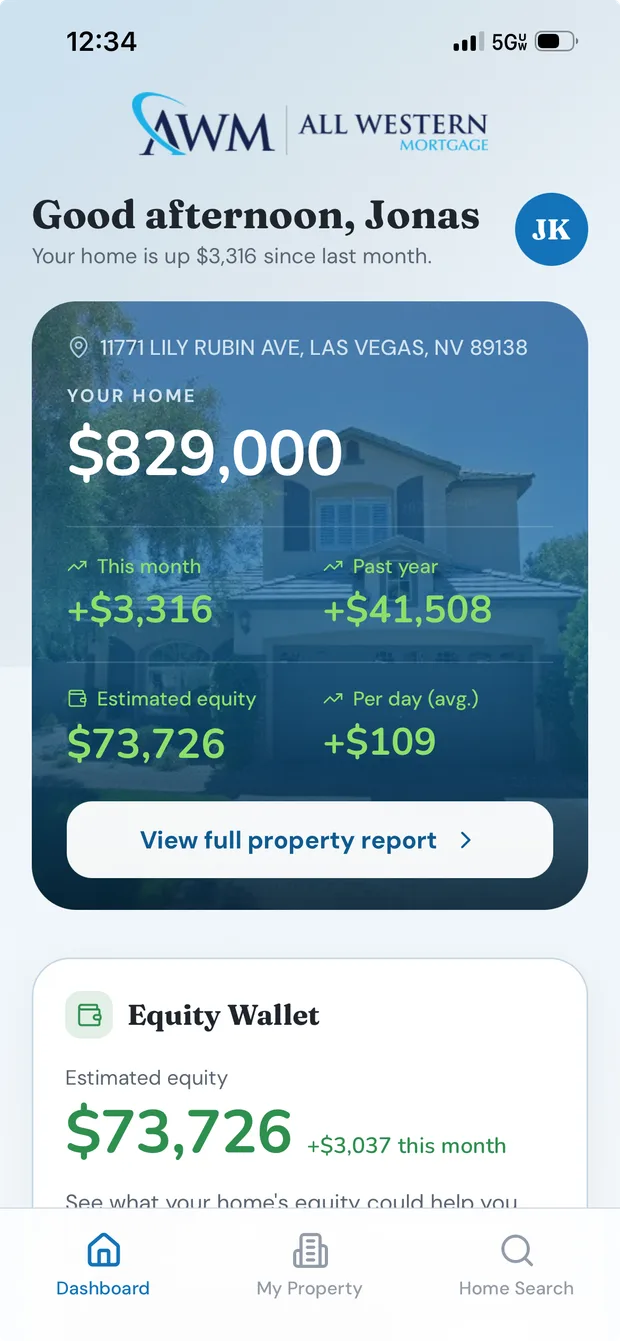
Your estimated value, updated as the market moves, with the change since last month right on the home screen.

See the whole neighborhood
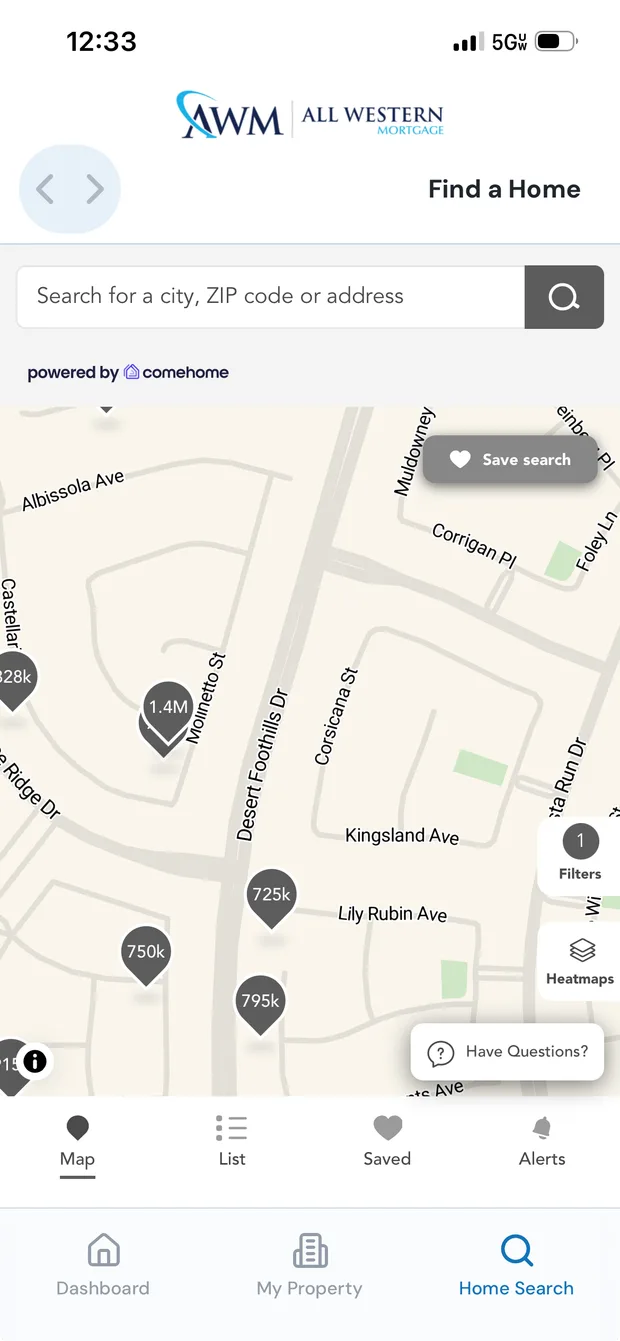
Every home for sale near you, and every one recently sold — including what it actually closed at.

Browse completely private
No ads, no lead forms, no agents calling. Looking here doesn't put your name on anyone's list.
What's inside
Everything about your home, in one place
No spreadsheets, no guessing, no calling around. Open the app and your home's whole picture — value, equity, and the market right around you — is already there.
Your home's value, tracked live
Open the app and the first thing you see is your address, a photo of your home, and what it's estimated to be worth today. Underneath it, whether that number went up or down since last month.
Under that, the change this month, the change over the past year, the equity you're sitting on, and even what it's averaging per day — so you see the trend, not just today's snapshot.
The equity you've built — and what it's for
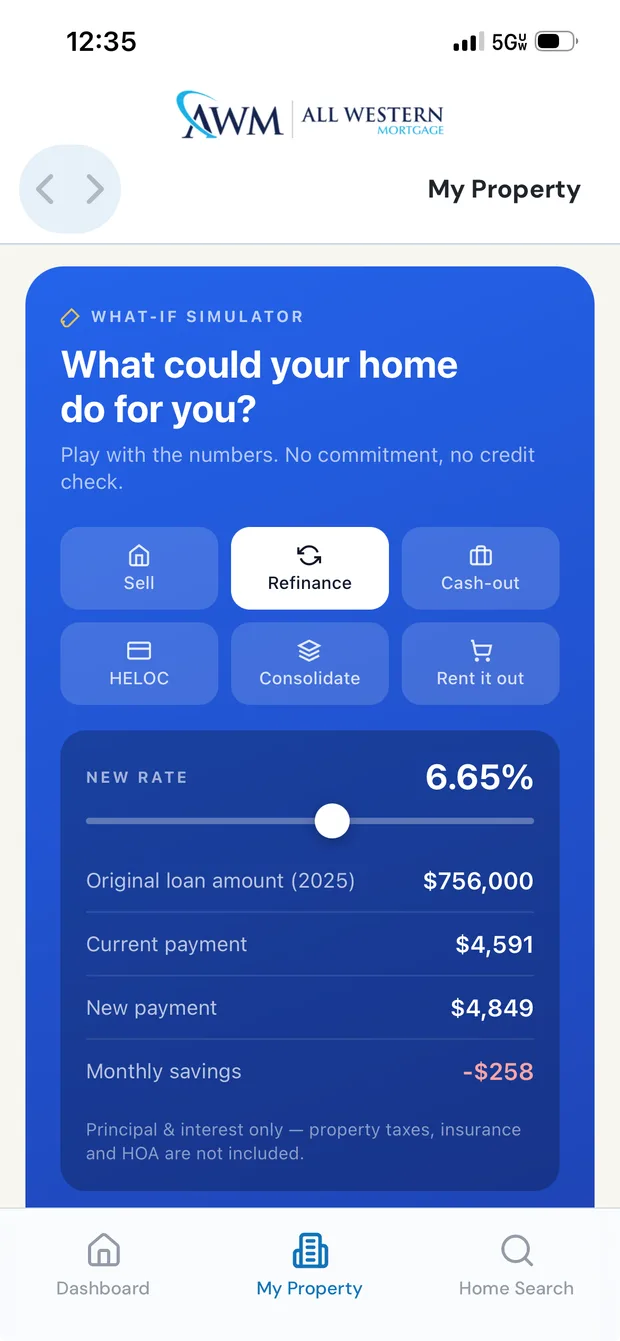
Equity is only useful if you know what you can do with it. A what-if simulator lets you try the options side by side — sell, refinance, take cash out, open a line of credit, consolidate debt, or rent it out — and see the number each one produces.
Move the rate slider and the payment moves with it. No forms, no phone call, no one on the other end of it. Just your own numbers, as many times as you want.
Your whole neighborhood — for sale and just sold
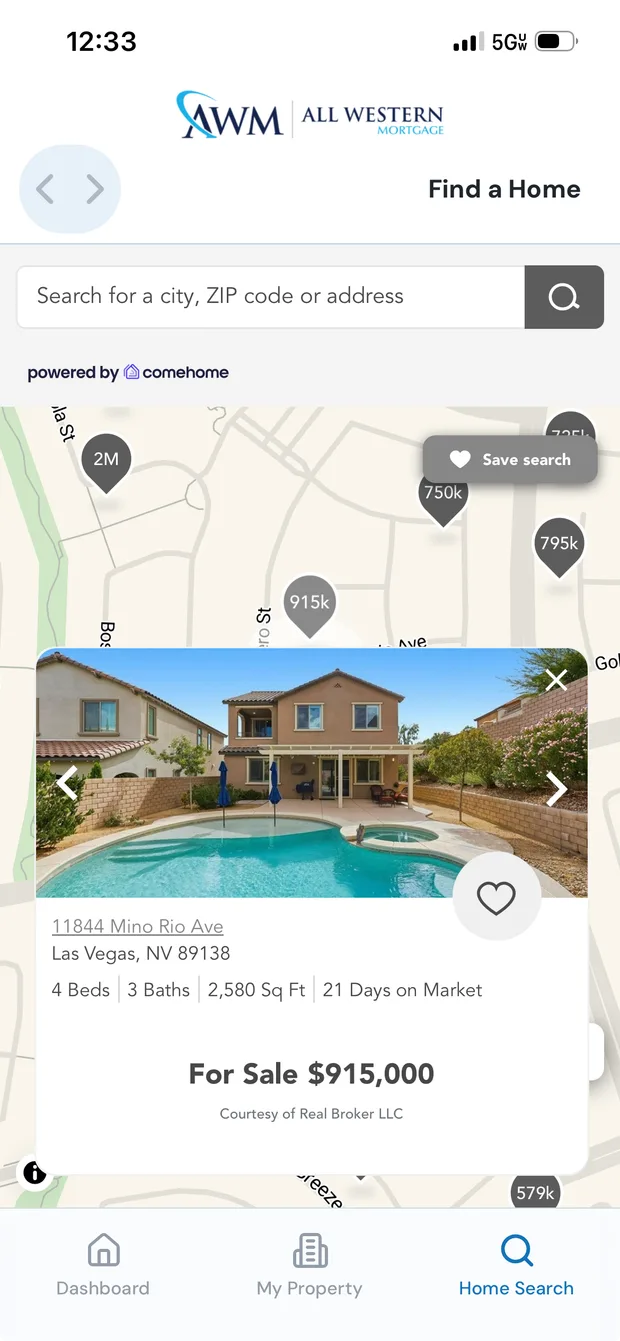
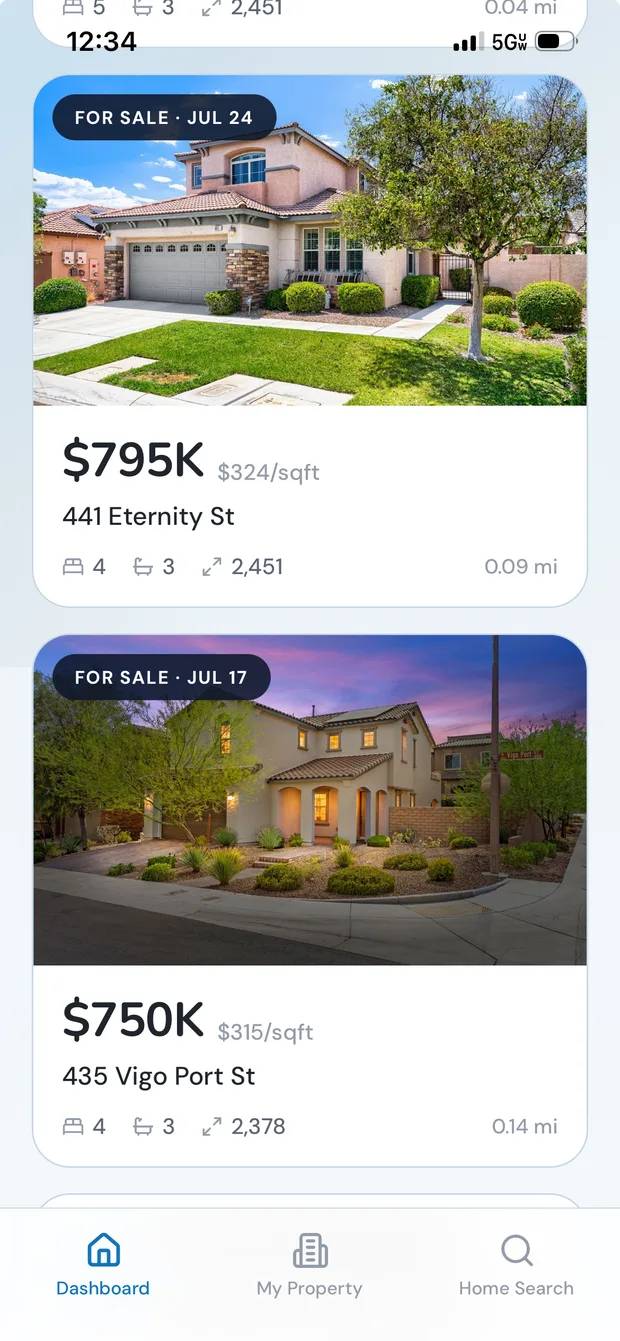
A full home search lives inside the app. See what's on the market near you, from the house down the street to the one across town, with photos, price, beds, baths and how far it is from your front door.
And crucially, what's sold. Asking prices tell you what sellers hope for; closed prices tell you what your neighborhood is actually worth. Both sit side by side, so you can see the gap for yourself.
You're already signed in, so saved homes and searches are still there next time — no account to make, no email to hand over.
Your privacy
Look all you want. Nobody calls.
You know what happens on the big listing portals. You click one house, and the calls start. Your name, your number and the home you looked at get sold to whoever paid for that ZIP code — and the page fills with ads for the rest.
Pathways Home doesn't work that way. You're not the product here. Browsing is just browsing.
The big listing sites
- Your details sold as a lead the moment you log in
- Agents calling and emailing about homes you glanced at
- Ads for lenders and agents on every screen
- Your search history feeding an ad profile
Pathways Home
- Your details are never sold — not to agents, not to anyone
- Nobody contacts you. You reach out when you're ready
- Zero ads, anywhere in the app
- What you browse is never sold or advertised against
- Only your own loan officer sees your activity — nobody else, ever
You start every conversation
The only person you can reach is your own loan officer, and only when you tap Call or Email. Nothing you look at triggers a call.
Not a lead-generation app
Your lender already knows you — you closed a loan with them. There's no lead to sell, which is the whole reason this can stay quiet.
No password to steal
You sign in with your mobile number and a one-time code. Your session is stored in your phone's secure keychain.
Invitation only
Only homeowners already known to a participating lender can sign in. If there's no matching record, there's no access.
What's happening on your block
Beyond the map, a plain list of the homes closest to you — price, price per square foot, beds, baths, size, and how far each one is from your front door. Down to a tenth of a mile.
It's the fastest way to answer the question every homeowner actually has: what is a house like mine going for right now?
A daily read on your home
A short feed of what's worth knowing today — value moves, market shifts, and timely nudges when something changes that actually affects you.
Your loan officer, one tap away
The person who helped you buy is right there — name, photo, title and NMLS number, with call and email buttons. The whole app wears their company's branding, so it feels like it came from them. You reach out when you want to; they're never told you were looking.
The full property report
Tap through to a complete, personalized report on your property: value history, comparable sales, and the details behind the estimate.
Cash-out snapshot
See what rolling higher-interest debt into your mortgage could save each month — and share the summary with your advisor or your partner.
How much home can I afford
Walk through your income and see what you could comfortably borrow before you start looking, so the search stays realistic.
Getting started
Three steps, about a minute
Pathways Home comes to you through your lender or loan officer. Everything about your home is already loaded before you arrive.
Get your invite
Your loan officer sends you a link. Tap it and the app opens straight to your own home — no account to create.
Verify your number
Enter your mobile number and the code we text you. That's the whole sign-in. There's no password to remember or lose.
Your home, ready
Your address, photo, value and equity are already there. Nothing to fill in, nothing to upload.
Questions
Good to know
Does Pathways Home cost anything?
No. The app is free for homeowners. Your lender or loan officer provides it as part of staying in touch after your loan closes.
Why do you need my phone number?
Your phone number is how we find your home. We match it against your lender's records, then text you a one-time code to confirm it's really you. It replaces a password entirely.
I entered my number and it didn't recognize me.
That usually means the number on file with your lender is a different one. Ask your loan officer to check the mobile number on your record, or to send you a fresh invite link.
If I look at a house, will an agent call me?
No. Looking at a home in Pathways Home doesn't notify anyone, doesn't create a lead, and doesn't put you in a queue. This is the main way the app differs from the national listing sites, where a single click can mean weeks of calls. The only person you'll hear from is your own loan officer, and only after you contact them first.
Do you sell my information or show me ads?
Neither. There are no ads anywhere in the app, and your information isn't sold to agents, lenders, or data brokers. Your lender provides the app to stay useful to you after closing — they're not reselling your attention to somebody else.
Can I see what homes actually sold for?
Yes. Alongside what's currently for sale, you can see homes near you that recently closed and the price they closed at. That's usually a truer read on your neighborhood than asking prices, and it's the same kind of data that sits behind your own home's estimated value.
How accurate is my home's estimated value?
It's an automated estimate built from market data and recent comparable sales in your area — a good indicator of where you stand, not a formal appraisal. For anything official, your loan officer can order a real appraisal.
Are the equity numbers a loan offer?
No. Everything in the app is an estimate to help you think things through. Any actual borrowing goes through your lender's normal application and approval process.
What if I sell my home or move?
The home search is built right in, and your loan officer is one tap away. Once you close on a new home, the app follows you to the new address.
Can I use it if I'm not working with a lender yet?
Not today. Pathways Home is offered through participating lenders and loan officers, so you'll need an invite to get in.